
Service Call Setup
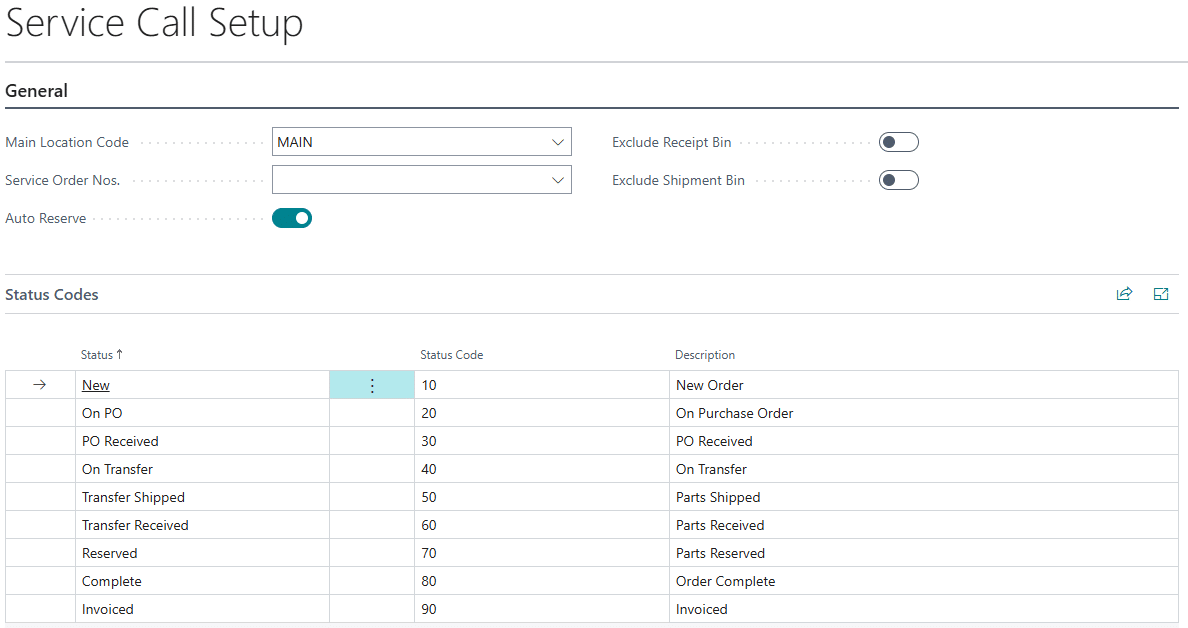
MAIN LOCATION CODE – The Main Location is the warehouse that is designated as the warehouse where all parts will be received into and transferred from.
SERVICE ORDER NOS. – This field is not required. If multiple number series are setup for sales orders, enter a series to automatically turn on the service call features for the sales order. If a series isn’t setup, the service call features can be turned on when a sales order is entered.
AUTO RESERVE – Set this option to reserve inventory during the workflow. Inventory will be reserved in the following processes:
- When a Transfer Order is created, an outbound reservation and inbound reservation to the sales order.
- When there is enough inventory at the tech location to fulfill the service order sales line.
EXCLUDE RECEIPT BIN – If bins are set for either the Main or a Technician location, setting this option will tell the inventory availability calculations used by the Service Call product to not view items in the bin marked as the Receipt bin as available.
EXCLUDE SHIPMENT BIN – If bins are set for either the Main or a Technician location, setting this option will tell the inventory availability calculations used by the Service Call product to not view items in the bin marked as the Shipment bin as available.
STATUS – The statuses used by Service Call Management are added automatically when the extension is installed. A status change is triggered by the following events:
- Entered – When a service order is first entered into Business Central for the TECH location.
- On PO – When a service call item is added to a linked purchase order from MAIN.
- PO Received – When the purchase order has been received into the MAIN location.
- On Transfer – When a service call item is added to a linked transfer order from MAIN.
- Transfer Shipped – When the linked transfer order ships and the parts are in transit from MAIN.
- Not applicable if direct transfers are being used.
- Transfer Received – When the linked transfer order is received into the TECH location.
- Not applicable if Auto Reserve is marked as the items will immediately be reserved when the transfer is received.
- Reserved – When the quantity is reserved on the service order.
- Complete – The service order is marked complete manually on the order.
- Incomplete service orders cannot be invoiced.
- Invoiced – The service order has moved to a posted invoice.
STATUS CODE – If your company uses coding for the status of the service call, a code up to 3 characters can be entered here. This field is not required.
DESCTRIPTION – Enter a long description to use for the status. This field is not required.