
Dynamics GP with multi-bins provides the ability to record one Default Material Issue Bin at the Item-Site level. There are many circumstances where this single bin is not sufficient to meet real world inventory management requirements. The BOM Bins module … more...
Category: Inventory
MFG PowerPack Lead Time Utility
The Lead Times Utility calculates the Manufacturing Fixed and Variable Lead Times shown on the Item Resource Planning window. The WilloWare utility has several important improvements over the similar utility provided in the Manufacturing Module:
- It is significantly faster because
GP PowerPack Auto-Select Lot Numbers
Automatically Select Lot Numbers with the click of a button!
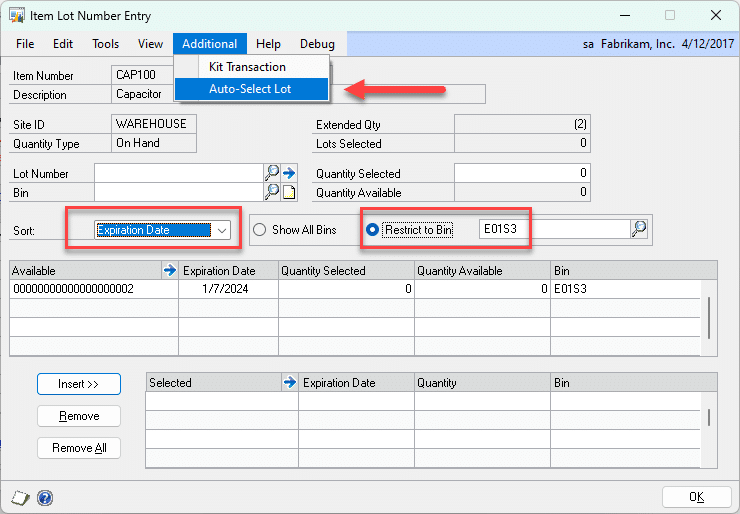
WilloWare’s Auto-Select Lot Numbers enhancement in GP PowerPack adds the ability to automatically select lot numbers in the following windows in Dynamics GP:
- Item Lot Number Entry (Item Transaction Entry)
MFG PowerPack BOM Compare
BOM Compare analyzes the exploded Bill of Materials for two or more Manufacturing BOMs to create a list of common components.
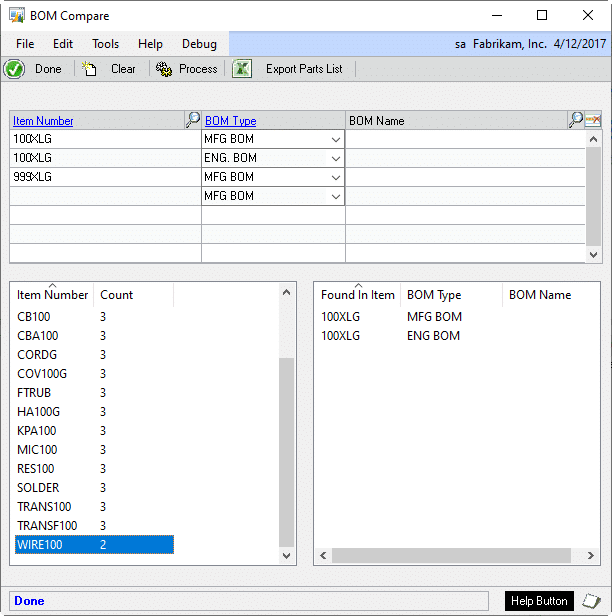
Enter two or more Bills of Material in the top scrolling window. BOM Compare loads the exploded bill of … more...
MFG PowerPack Actual Cost Rollup

The Actual Cost Rollup in MFG PowerPack does a roll-up using Actual Cost (FIFO/LIFO PERPETUAL) items or Standard Cost (FIFO/LIFO PERIODIC) items. Since its pending cost tables are completely separate from Inventory and Manufacturing you can play with costing changes … more...
MFG PowerPack SOP Backorder All
SOP Backorder All overrides the normal document allocation and fulfillment logic on Sales Orders so that regardless of any available inventory, the Quantity Ordered is set to Backordered. This is particularly useful with GP Manufacturing when all finished goods are … more...
SOP-POP MultiLink
SOP-POP MultiLink provides superior flexibility in the ability to create and maintain links between back-ordered Sales Line and Purchase Order.
- Create links from a single Sales Order line to multiple PO Lines
- Create links from a single PO Line to
MFG PowerPack Modules
The complete listing of MFG PowerPack Modules is below. While most of the Modules require that the GP Manufacturing suite is installed, some do not and are indicated with an asterisk (*).
MFG PowerPack Tweaks
MFG PowerPack is a Suite of modules for enhancing GP Manufacturing and its connections to Field Service, Inventory, Purchase and Sales. Within MFG PowerPack is a collection of Manufacturing Tweaks, which are smaller enhancements.
Manufacturing Tweaks:
- Auto-Create Routing Header
MFG PowerPack Vendor Pricing
Vendor Pricing supports Item-Vendor Price Lists with Quantity Breaks. It maintains a Current Price List, as well as an unlimited number of Pending Price Lists based on Effective Dates. It also provides the ability to pull a default Unit Cost, … more...
MFG PowerPack SmartParts
SmartParts is a “logical” ID Number generating tool to assist users in creating ID Numbers where each segment of the ID Number has coded meaning. For example, an Item Number might consist of several segments with each segment representing different … more...
MFG PowerPack Serial Number Mass Entry
Serial Number Mass Entry is a copy-paste utility for entering large amounts of serial numbers into GP from an external source. With Serial Number Mass Entry you can copy a list of serial numbers from an external source (Excel, text … more...
MFG PowerPack Pre-Assign Serial & Lot Numbers
The Pre-Assign Serial/Lot Numbers module in MFG PowerPack automatically pre-assigns serial/lot numbers when a manufacturing order is created.
The next serial or lot number can be generated using the Serial/Lot Mask, or custom numbering logic can be added. For example, … more...
MFG PowerPack Serial/Lot Auto-Generate
Serial/Lot Auto-Generate enhances the Lot AND Serial numbering functionality in GP. Use the Serial/Lot Mask to auto-generate serial numbers and lot numbers on any GP transaction. Serial/Lot Mass Generate extends automated serial numbering AND lot numbering to the following transactions … more...
MFG PowerPack Scrap Reporting
The Scrap Reporting module in MFG PowerPack tracks, reports on, and costs scrap. It integrates with GP Manufacturing Component Transactions to adjust the cost of scrap out of Manufacturing WIP and into dedicate Scrap GL accounts.
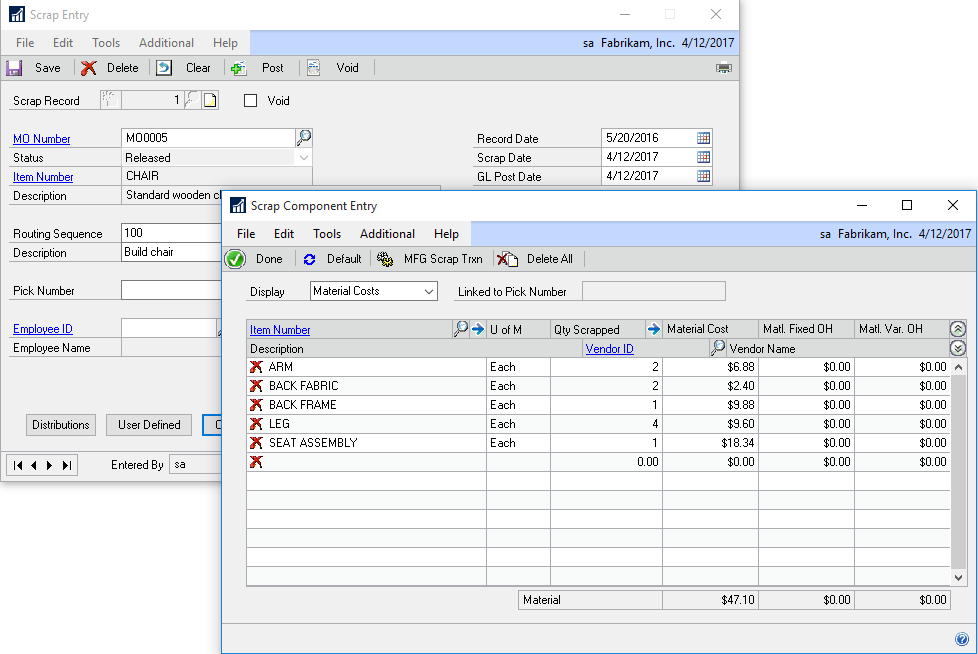
Removing the cost of … more...
MFG PowerPack Sales Forecast Integration
Sales Forecast Integration provides a two-way link between GP Manufacturing Sales Forecasting and Microsoft Excel. With SFI all forecasting can be done outside of GP in Excel, in multiple spreadsheets with multiple users, and the complete forecast imported back into … more...
MFG PowerPack Quick Disassembly
Quick Disassembly uses the GP Manufacturing Bill of Materials, or the Picklist from a Manufacturing Order, to disassemble finished good items into component parts. This tool creates a simple disassembly transaction based on an Inventory Adjustment, and is ideal for … more...
MFG PowerPack Reverse Issue Date Override
Reverse Issue Date Override changes the date on which inventory is re-added to the system when posting a Reverse Issue Transaction.
The normal behavior of GP is to put the inventory back on the Original Receipt Date, which can cause … more...
MFG PowerPack PO Revision Levels
PO Revision Levels tracks a Revision Level for each PO Line, and automatically adds that information to the Purchase Order so it can be sent to your Vendor. The PO Rev Level is visible on all Purchase Order and Receiving … more...
MFG PowerPack Proposed Cost Update
Proposed Cost Update automates setting a new Standard Cost for Buy Items. Proposed Cost Update provides several methods for calculating a new Standard Cost for a range of Items or Item Classes.
Update methods include setting the new Standard equal … more...
MFG PowerPack PowerATP
PowerATP adds numerous enhancements to the Dynamics GP Inventory Available to Promise window which take it to a whole new level. The PowerATP window…
- Includes MRP Planned MOs and POs
- Includes In Transit Transfers
- Includes Service Call and Depot Work
MFG PowerPack Picking Bin Update
Support picking inventory for specific Work Cells by quickly updating the Issue From and Issue To Bin for all items on a Picklist to match the Bin(s) assigned to the Work Cell.… more...
MFG PowerPack Lead Time Inquiry
Lead Time Inquiry calculates the minimum time needed to produce a specified quantity of a made item considering manufacturing and vendor lead times and inventory shortages. It calculates a “mini-MRP” on the entire exploded Bill of Materials to arrive at … more...
MFG PowerPack Item Valuation Update
Item Valuation Update sets the Valuation Method of non-Sales Inventory type items so they can be used on the GP Bill of Materials for a Standard Cost item.
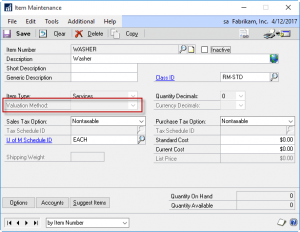
For example, some items may be have so little value that you … more...
MFG PowerPack Item Copy
WilloWare’s Item Copy provides for quick setup of new inventory items by copying all of the setup from an existing item to a new item. Our Item Copy includes Manufacturing and Field Service tables, which are not copied by the … more...
MFG PowerPack Item Class Serial/Lot Mask
Item Class Serial/Lot Mask supports defining a single serial or lot number mask which applies to all serial or lot numbers generated for the items with an Item Class. Each serial number generated will be unique for the entire class … more...
MFG PowerPack Commodity Surcharge
Commodity Surcharge tracks the spot price of commodities, and adds surcharges during invoicing to cover the difference in the spot price between the date on which a price was quoted and the date of invoicing.
Create an unlimited number of … more...
MFG PowerPack Capable to Promise Inquiry
Capable To Promise Inquiry calculates the maximum quantity of an item that could be made immediately given available inventory, and ranks the component items based on inventory availability to give the user a quick overview of which components are build-limiting … more...
SpellCheck
SpellCheck for Dynamics GP provides spell-checking on any Note, Comment, Text or String field in GP and 3rd party products. SpellCheck can be attached to any text entry field in the application.
Use SpellCheck to check spelling on:
- Notes &
LeanMFG
LeanMFG is a complete manufacturing suite for Dynamics GP specifically designed for smaller manufacturers, and those whose processes include disassembly, batch, and multi-product production. Targeted for the Business Essentials customer, LeanMFG provides flexibility and ease-of-use that appeals to all users. … more...
LabelLink
LabelLink provides a connection between Dynamics GP and Bar Code Printing software so you can automatically print to a bar code label printer from inside of Dynamics GP.
LabelLink prepares data from Dynamics GP so that it can be easily … more...
Item Process Tracking
Item Process Tracking (IPT) is a configurable data collection template which can be attached to any Item-Transaction combination in Dynamics GP.
IPT is designed to address the need to record specific information about an item, or a process on or … more...
Engineer to Order
Engineer to Order (ETO) produces a Manufacturing Estimation (ME), which is the estimated cost to produce an item to a customer’s specifications. The ME is comprised of an Estimation BOM, Routing and list of Miscellaneous Costs. A tight integration to … more...
Consulting Toolkit
Consulting ToolKit is a suite of powerful tools designed to help consultants and power users. It contains Stored Queries, which allows end-users to securely execute ad-hoc tSql queries created by an admin, and Virtual Triggers, which provides the ability to … more...
CompleteCount
CompleteCount provides the tools needed to perform a controlled cycle count in Dynamics GP using stock tags. The stock tag method of conducting a physical count provides for an audit trail of the count, ensures a higher degree of accuracy, … more...
GP PowerPack UofM Schedule Change
Enables changing a U of M Schedule for an item and automatically updating all affected master record and transaction tables throughout Dynamics GP, Manufacturing and Field Service. The utility automatically maps Units of Measure between the old Schedule and the … more...
GP PowerPack SOP Revision Level Tracking
Enables tracking customer requested product revision levels in Sales Transaction Entry. Track initial requested level, changes, and reasons for the change. Add Revision Level to any existing core GP report, or modified SOP Report.… more...
GP PowerPack SOP Auto-Select Bin
Eliminates the need to manually select bins in Sales Transaction Entry by automatically fulfilling an order from available inventory across multiple bins. If Bin Priorities are specified for an item, bins will be used in order of priority, otherwise they … more...
GP PowerPack Site To Bin Migration
Site To Bin Migration is a tool to aid in quickly making a transition from multiple Location Codes to Multi-Bins. Site to Bin Migration allows mapping of the AUTOCREATE bin in source Sites, to destination Bins in a master site. … more...
GP PowerPack Shortage Inquiry
Shortage Inquiry provides a consolidated view of inventory shortages for an Item from Sales Backorders, Manufacturing Picklists, and Service Call Parts. When receiving inventory know immediately where that inventory is needed. For Manufacturing Shortages, immediately see the MO Status and … more...
GP PowerPack Series Post Filter
Add multiple Batch selection criteria to the Series Post windows in Financials, Receivables, Payables and Inventory. Quickly locate a sub-set of Batches, such as all Financials Batches originating in Manufacturing, so that they can be marked and posted as a … more...
GP PowerPack Posting Controls
Control posting throughout GP with an allowed maximum dollar amount that a user is allowed to approve/post. Posting Controls are set on a per-user, per-document basis, and are available for virtually every window in Dynamics GP with a Post button. … more...
GP PowerPack Note Locking
Enables locking of all Notes in Dynamics GP, including Form-level and Record-level notes. Use a “soft lock” (no password) to prevent accidental changes to or deletion of a record-level note on a Sales Transaction. Or, use a “hard lock” (requires … more...
GP PowerPack Next Number Generator
Create system maintained numbering sequences for ID fields in GP and 3rd Party Products. When creating a new master record, create the ID by selecting the Next Number from the Next Number Lookup. Next Number Generator supports an unlimited number … more...
GP PowerPack Mass Batch Change
Mass Batch Change quickly moves documents to a new Batch. Use Query Builder to create and save a query to identify target documents to transfer, or create your own Custom Query in tSql. If you transfer documents between batches to … more...
GP PowerPack Kit Transactions
Kit Transactions will add all of the components of a kit to an Inventory Transaction without having to individually select each component. Kit Transactions calculates the quantity needed for each component and checks for available inventory before adding any components … more...
GP PowerPack IV Mass Transaction
IV Mass Transaction creates an Inventory Transfer or Adjustment of all inventory in a selected “From Site” and “From Bin”.
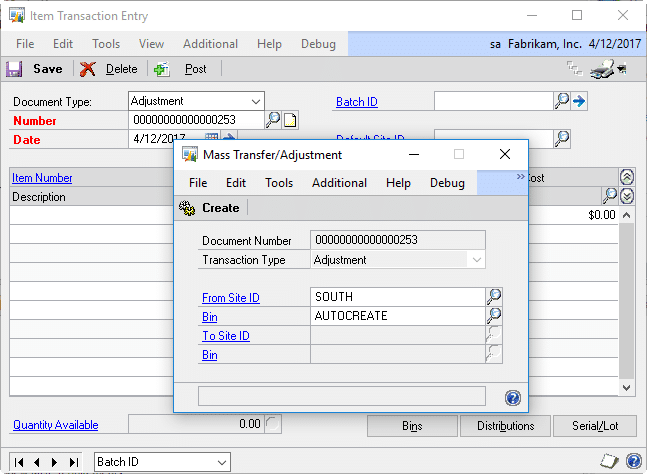
Create an Adjustment to remove everything from a specified Site/Bin (it works with or without Multi-bins enabled).
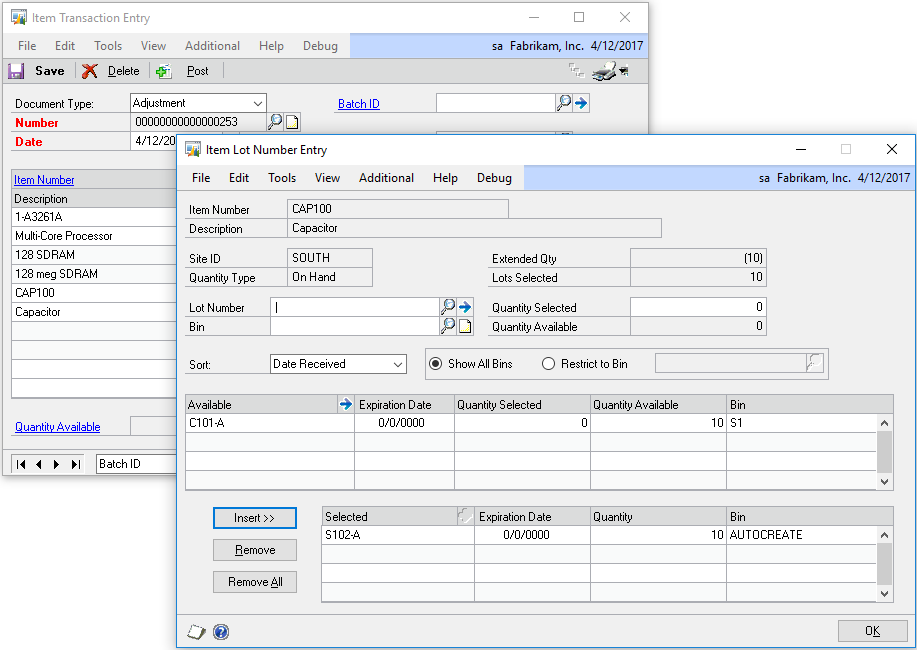
The IV Mass … more...
GP PowerPack idModifier
idModifier is a utility for updating ID fields (strings) in the Dynamics GP Company database. idModifier takes a novel approach in that it can be “trained” to update ANY string field, so it can handle updates beyond just the core … more...
GP PowerPack Extended Lot Attributes
Extended Lot Attributes track an unlimited number of user-defined lot attributes beyond the normal five provided by Dynamics GP. The ELA fields are “attached” to the Lot Number, so they are available no matter where the Lot Number is used. … more...
GP PowerPack Bin-to-Bin Transfers
The GP PowerPack Bin-to-Bin Transfers module creates a regular inventory transfer transaction to move inventory between bins. Unlike the bin-to-bin functionality provided with out of the box Dynamics GP, the WilloWare Bin-to-Bin Transfer can be saved in a batch, posted … more...