
Dynamics BC Tariff Management is a solution for automatically calculating and applying tariff and duty surcharges on sales orders in Microsoft Dynamics 365 Business Central. Tariff Management provides an extensive degree of configuration to suit your needs. A Tariff Code … more...
Category: Products by Series
MFG PowerPack BOM Bins
Dynamics GP with multi-bins provides the ability to record one Default Material Issue Bin at the Item-Site level. There are many circumstances where this single bin is not sufficient to meet real world inventory management requirements. The BOM Bins module … more...
MFG PowerPack Lead Time Utility
The Lead Times Utility calculates the Manufacturing Fixed and Variable Lead Times shown on the Item Resource Planning window. The WilloWare utility has several important improvements over the similar utility provided in the Manufacturing Module:
- It is significantly faster because
GP PowerPack Auto-Select Lot Numbers
Automatically Select Lot Numbers with the click of a button!
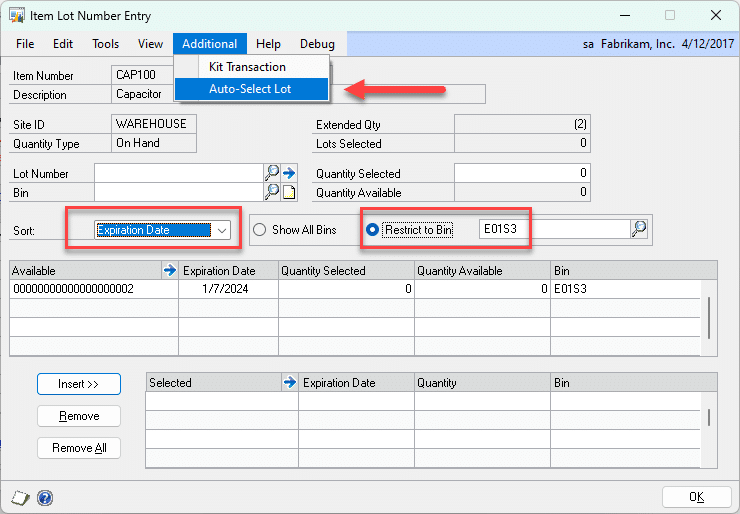
WilloWare’s Auto-Select Lot Numbers enhancement in GP PowerPack adds the ability to automatically select lot numbers in the following windows in Dynamics GP:
- Item Lot Number Entry (Item Transaction Entry)
MFG PowerPack BOM Compare
BOM Compare analyzes the exploded Bill of Materials for two or more Manufacturing BOMs to create a list of common components.
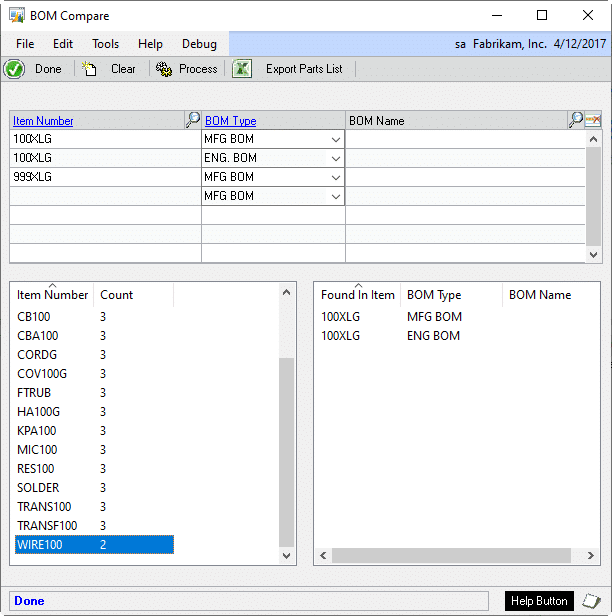
Enter two or more Bills of Material in the top scrolling window. BOM Compare loads the exploded bill of … more...
MFG PowerPack Buy Picklist
Buy Picklist is ideal for a Make to Order or Engineer to Order environment where you need to purchase the materials needed for a job, it is also useful for purchasing to address shortages on a job. Buy Picklist creates … more...
GP PowerPack FAST Sales Serial Entry
FAST Sales Serial Entry replaces the standard Dynamics GP Sales Serial Entry window with one that can easily handle very large number of serial numbers. In GP2013 Microsoft added the ability to “multi-select” serial numbers which required changing the “Available … more...
MFG PowerPack Actual Cost Rollup

The Actual Cost Rollup in MFG PowerPack does a roll-up using Actual Cost (FIFO/LIFO PERPETUAL) items or Standard Cost (FIFO/LIFO PERIODIC) items. Since its pending cost tables are completely separate from Inventory and Manufacturing you can play with costing changes … more...
MFG PowerPack SOP Backorder All
SOP Backorder All overrides the normal document allocation and fulfillment logic on Sales Orders so that regardless of any available inventory, the Quantity Ordered is set to Backordered. This is particularly useful with GP Manufacturing when all finished goods are … more...
Customization CR0996 Return Caps
Customization CR0996
Return Caps
Description of Need:
ACME needs to place a cap on dollar value of product a customer can return in a set period. No automation is required to enforce the cap values.
Description of Solution
Navigation: Tools>>Setup>>Sales>>Return … more...
SOP-POP MultiLink
SOP-POP MultiLink provides superior flexibility in the ability to create and maintain links between back-ordered Sales Line and Purchase Order.
- Create links from a single Sales Order line to multiple PO Lines
- Create links from a single PO Line to
MFG PowerPack BOM History Inquiry
The BOM History Inquiry window is a “Most Recently Viewed” list for the BOM Entry and BOM View windows. It provides quick access to a previously viewed BOM, making it easy to drill down into lower level assemblies and … more...
MFG PowerPack EMOS Query
EMOS Query is used to create and save queries that restrict the EMOS (Edit MO Status) scrolling window. For example, a query could select only MOs with Configured BOMs that include the Work Center SAW on the routing. EMOS Query … more...
MFG PowerPack Modules
The complete listing of MFG PowerPack Modules is below. While most of the Modules require that the GP Manufacturing suite is installed, some do not and are indicated with an asterisk (*).
GP PowerPack Payables Tweaks
GP PowerPack Tweaks includes enhancements for all parts of Dynamics GP. The Payables Tweaks are:
- PM Apply Zoom-Zoom to Document: The Payables Apply Zoom window shows the applied documents, but does not provide a way to view them in
MFG PowerPack BOM Alternates
The BOM Alternates enhancement provides the ability to automatically use Alternate Items when there is a shortage of the Primary Item.
The GP Manufacturing Bill of Materials provides the ability to assign one or more Items as Alternates for a … more...
MFG PowerPack Time Card
Time Card provides an easy to use time entry module for GP Manufacturing. Many manufacturers would like to track information about actual labor and machine time so they can analyze performance against standards, however many do not do this because … more...
MFG PowerPack Tweaks
MFG PowerPack is a Suite of modules for enhancing GP Manufacturing and its connections to Field Service, Inventory, Purchase and Sales. Within MFG PowerPack is a collection of Manufacturing Tweaks, which are smaller enhancements.
Manufacturing Tweaks:
- Auto-Create Routing Header
MFG PowerPack Where Used Inquiry
Where Used Inquiry displays the position of any component in a graphical, multi-level, indented bill of materials.
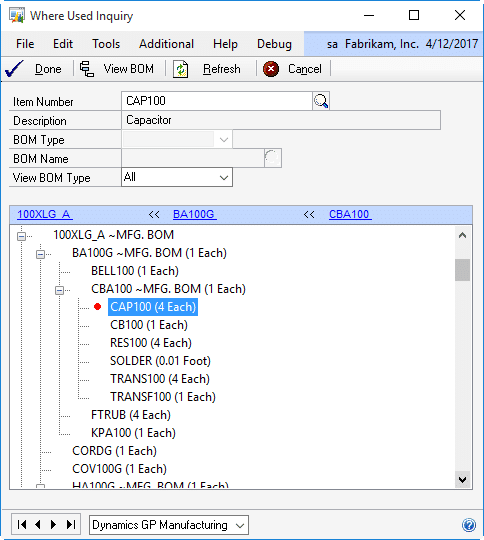
The Where Used Inquiry shows each BOM which contains the given item. The BOMs are exploded to the level where the item occurs, … more...
MFG PowerPack Vendor Pricing
Vendor Pricing supports Item-Vendor Price Lists with Quantity Breaks. It maintains a Current Price List, as well as an unlimited number of Pending Price Lists based on Effective Dates. It also provides the ability to pull a default Unit Cost, … more...
MFG PowerPack SO-MO Delete
SO-MO Delete automatically breaks an SO-MO Link when the sales line is deleted, and if possible, it also deletes the linked Manufacturing Order.… more...
MFG PowerPack SmartParts
SmartParts is a “logical” ID Number generating tool to assist users in creating ID Numbers where each segment of the ID Number has coded meaning. For example, an Item Number might consist of several segments with each segment representing different … more...
MFG PowerPack Service Equipment Suite
The Service Equipment Suite consists of:
- Automated Configuration Builder – when an Equipment Record is created from Sales Transaction Entry, the Configuration Builder will automatically create a Configuration record using the SOP Number, add the Equipment Record to the Configuration,
MFG PowerPack Serial Number Mass Entry
Serial Number Mass Entry is a copy-paste utility for entering large amounts of serial numbers into GP from an external source. With Serial Number Mass Entry you can copy a list of serial numbers from an external source (Excel, text … more...
MFG PowerPack Pre-Assign Serial & Lot Numbers
The Pre-Assign Serial/Lot Numbers module in MFG PowerPack automatically pre-assigns serial/lot numbers when a manufacturing order is created.
The next serial or lot number can be generated using the Serial/Lot Mask, or custom numbering logic can be added. For example, … more...
MFG PowerPack Serial/Lot Auto-Generate
Serial/Lot Auto-Generate enhances the Lot AND Serial numbering functionality in GP. Use the Serial/Lot Mask to auto-generate serial numbers and lot numbers on any GP transaction. Serial/Lot Mass Generate extends automated serial numbering AND lot numbering to the following transactions … more...
MFG PowerPack Scrap Reporting
The Scrap Reporting module in MFG PowerPack tracks, reports on, and costs scrap. It integrates with GP Manufacturing Component Transactions to adjust the cost of scrap out of Manufacturing WIP and into dedicate Scrap GL accounts.
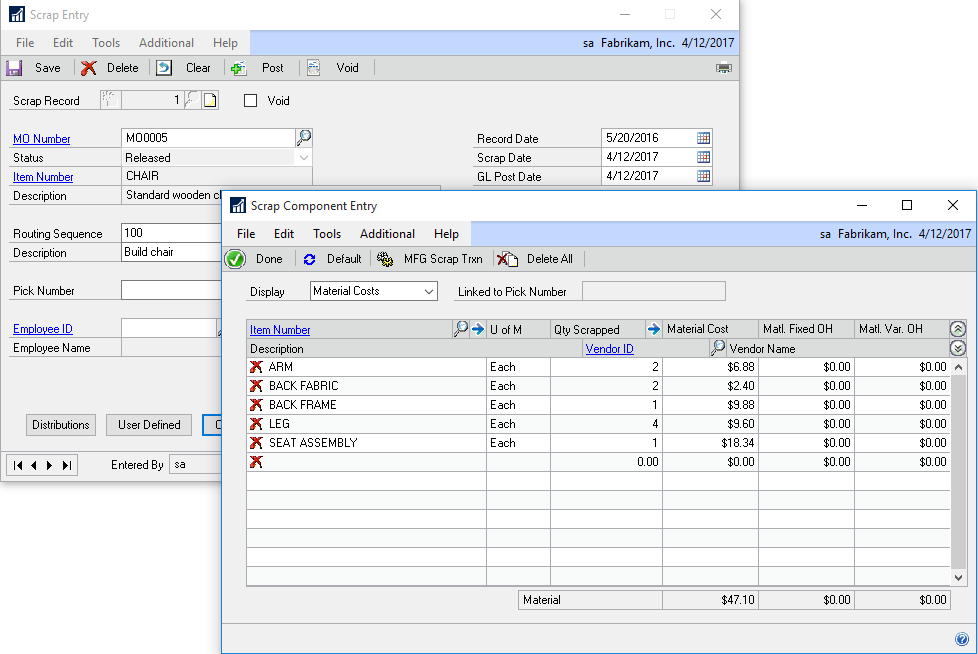
Removing the cost of … more...
MFG PowerPack Sales Forecast Integration
Sales Forecast Integration provides a two-way link between GP Manufacturing Sales Forecasting and Microsoft Excel. With SFI all forecasting can be done outside of GP in Excel, in multiple spreadsheets with multiple users, and the complete forecast imported back into … more...
MFG PowerPack QuickWIP
QuickWIP provides simple WIP data recording when manufacturing is set up to use Backflushing. Even though you may be backflushing labor and machine time, you still might want to track progress on the MO–When did a sequence start? When did … more...
MFG PowerPack Quick Disassembly
Quick Disassembly uses the GP Manufacturing Bill of Materials, or the Picklist from a Manufacturing Order, to disassemble finished good items into component parts. This tool creates a simple disassembly transaction based on an Inventory Adjustment, and is ideal for … more...
MFG PowerPack Reverse Issue Date Override
Reverse Issue Date Override changes the date on which inventory is re-added to the system when posting a Reverse Issue Transaction.
The normal behavior of GP is to put the inventory back on the Original Receipt Date, which can cause … more...
MFG PowerPack PO Revision Levels
PO Revision Levels tracks a Revision Level for each PO Line, and automatically adds that information to the Purchase Order so it can be sent to your Vendor. The PO Rev Level is visible on all Purchase Order and Receiving … more...
MFG PowerPack Proposed Cost Update
Proposed Cost Update automates setting a new Standard Cost for Buy Items. Proposed Cost Update provides several methods for calculating a new Standard Cost for a range of Items or Item Classes.
Update methods include setting the new Standard equal … more...
MFG PowerPack PowerATP
PowerATP adds numerous enhancements to the Dynamics GP Inventory Available to Promise window which take it to a whole new level. The PowerATP window…
- Includes MRP Planned MOs and POs
- Includes In Transit Transfers
- Includes Service Call and Depot Work
MFG PowerPack Picking Bin Update
Support picking inventory for specific Work Cells by quickly updating the Issue From and Issue To Bin for all items on a Picklist to match the Bin(s) assigned to the Work Cell.… more...
MFG PowerPack Outsourced PO Enhancements
Outsourced Purchase Order Enhancements (OPOE) modify the Outsourced Purchase Order so that the Description, Quantity Ordered and Cost provide more meaningful information to the Vendor, rather than reflecting “internal” information from the manufacturing routing.
OPOE adds an Outsourcing Description to … more...
MFG PowerPack Outsourced PO-Add to Existing PO
OSRC (Outsourced PO) Add To PO enables adding lines for outsourced services to an existing Regular PO. Often a single vendor is used for many processes across multiple Manufacturing Orders, and GP will create separate POs to the vendor. The … more...
MFG PowerPack MO Split
MO Split breaks a Manufacturing Order for a large quantity into any number of MOs of smaller quantity.
- MO Split divides one large order into smaller orders that fit better with work center capacity.
- The split MOs are still linked
MFG PowerPack MO Document Types
MO Document Types provides the ability to have unlimited Manufacturing Order document numbering sequences maintained by Dynamics GP.
-
- MO Document Types enables creating a Document Type (such as “PROTO” for prototype manufacturing orders) and a Document Number (such as “PROT0001”).
MFG PowerPack Lead Time Inquiry
Lead Time Inquiry calculates the minimum time needed to produce a specified quantity of a made item considering manufacturing and vendor lead times and inventory shortages. It calculates a “mini-MRP” on the entire exploded Bill of Materials to arrive at … more...
MFG PowerPack Item Valuation Update
Item Valuation Update sets the Valuation Method of non-Sales Inventory type items so they can be used on the GP Bill of Materials for a Standard Cost item.
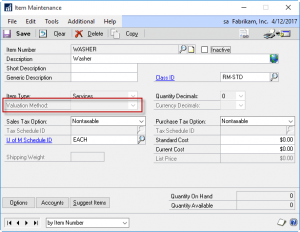
For example, some items may be have so little value that you … more...
MFG PowerPack Item Copy
WilloWare’s Item Copy provides for quick setup of new inventory items by copying all of the setup from an existing item to a new item. Our Item Copy includes Manufacturing and Field Service tables, which are not copied by the … more...
MFG PowerPack Item Class Serial/Lot Mask
Item Class Serial/Lot Mask supports defining a single serial or lot number mask which applies to all serial or lot numbers generated for the items with an Item Class. Each serial number generated will be unique for the entire class … more...
MFG PowerPack Configured BOM Auto-Naming
Configured BOM Auto-Naming automatically generates a BOM Name in Sales Configurator based on the SOP Number and SOP Line Number (such as STDORD2234-02, where 02 is the second line on the order). This tool provides an automated naming convention for … more...
MFG PowerPack Require Included Configuration Options
Require Included Configuration Options (part of MFG PowerPack) prevents unmarking configuration options in Sales Configurator that have been set as “Included” options. Normally Configurator will “include” items marked as Included in the default configured BOM, however the user can easily … more...
MFG PowerPack Commodity Surcharge
Commodity Surcharge tracks the spot price of commodities, and adds surcharges during invoicing to cover the difference in the spot price between the date on which a price was quoted and the date of invoicing.
Create an unlimited number of … more...
MFG PowerPack Capable to Promise Inquiry
Capable To Promise Inquiry calculates the maximum quantity of an item that could be made immediately given available inventory, and ranks the component items based on inventory availability to give the user a quick overview of which components are build-limiting … more...
MFG PowerPack BOM Type Security
BOM Type Security provides control over access to Bills of Material at the User ID – BOM Type level. Restrict access to Engineering BOMs to engineering users, and Manufacturing BOMs to production users. If a user attempts to access a … more...
MFG PowerPack BOM Archive
BOM Archive creates a snapshot of the entire, exploded, Bill of Materials structure (the top level of the BOM, and also the Bills of allsubassemblies), and stores it as a series of named Archived BOMs. The archival process can also … more...
MFG PowerPack Batch Processing
Batch Processing adds the ability to record routing steps based on batch size or processing capacity of a machine. A process which can handle a certain quantity, such as an oven being able to handle 200 bricks per cycle, can … more...